Facebook data breach: How to protect your data


Over the past decade, Facebook, like many other social platforms, has disclosed a range of security and data-related incidents. When these events are reported publicly, they often make headlines, but for users, the practical impact may show up later in the form of phishing attempts, account takeover attempts, or increased exposure of personal information.
This guide is designed to help you understand well-documented Facebook security incidents, check whether your own account may have been affected, and take practical steps to improve your privacy and account security. The goal is to help you continue using Facebook with greater confidence and control over your personal data.
Timeline of Facebook data privacy incidents
Below is a brief overview of widely reported events involving Facebook user data. The timeline includes regulatory actions, security incidents, and large-scale data exposures that have been documented by Facebook itself, regulators, or major news organizations.
2018: Cambridge Analytica data misuse
Whistleblower disclosures and Facebook’s own updates revealed that a third-party app collected data from up to 87 million profiles in ways users were largely unaware of. This data was subsequently obtained by consulting firm Cambridge Analytica and used for political advertising purposes.
In response, Facebook banned the app involved, alerted affected users, and introduced a link at the top of the News Feed to show which apps users use and the data those apps access. The Federal Trade Commission announced a $5 billion penalty against Facebook in 2019 over privacy violations related to the incident.
2018: “View As” access token attack
Facebook disclosed that attackers exploited a vulnerability in the “View As” feature, enabling them to steal access tokens from approximately 30 million people. Facebook responded by sending messages to all affected users, explaining the information that may have been exposed and the next steps to help protect their accounts. Ireland’s Data Protection Commission fined Meta €251 million over this breach.
2019: 419 million phone numbers exposed on an unsecured server
Technology news publication TechCrunch reported that a security researcher had found databases containing Facebook IDs and phone numbers, which were publicly accessible on the internet without a password. Facebook responded to CNN Business, stating the exposed database was outdated and affected approximately 200 million users (around half of the initial estimate) and that the databases were subsequently taken down.
2021: Over 530 million Facebook user records published online
Business Insider reported that hacker forums publicly released a large set of Facebook user records, primarily phone-to-identity mappings. Facebook explained that the data was scraped off the platform using its contact importer feature before September 2019, and it had since updated the feature to prevent misuse.
How to know if your Facebook data was breached
While many Facebook data incidents are addressed at the platform level, their effects can extend to individual users long after the initial disclosure. After any data breach, it’s important to understand your potential exposure and take steps to protect your accounts and personal information.
The following actions help you identify whether your data has been compromised and how to respond effectively.
Use a trusted data breach checker
Attackers often reuse data from one breach in many different scams. Checking your email address and phone number against known breach datasets provides an essential early warning about which account details you need to secure.
You can start by following these steps to safely assess your exposure:
1. Verify your Facebook email address and phone numbers
Before searching breach databases, confirm which email addresses and phone numbers you have linked to your Facebook account. You can find this information in the Accounts Center, which centralizes your information across Facebook, Instagram, and other linked Meta accounts.
2. Check identifiers on breach trackers
Services like Have I Been Pwned allow you to enter your email address to see a history of breaches where that identifier appears.
You can also use a password manager like ExpressVPN Keys, which uses Have I Been Pwned’s database to check if your email or passwords have appeared in data breaches. Keys also helps you identify compromised, weak, or reused passwords and guides you through replacing them with strong, unique ones to enhance your account security.
Note: Other third-party tools may brand themselves as Facebook data breach checkers. But before you type anything into them, confirm that they come from reputable companies with clear contact details and privacy policies. Copycat tools can sometimes appear after high-profile breaches, pulling in fresh data from people who are already worried.
3. Check for other breaches involving your Meta account
Run a similar check for any other major breaches that mention Facebook Marketplace, Instagram, or services that share a Meta account. Have I Been Pwned lists each incident on its Who’s Been Pwned page so you can see where a given identifier has appeared.
4. Set up data breach alerts
Turn on breach alerts if the service offers them, so you get an email whenever new breaches include your data. For example, if you’re in the U.S., you can use ExpressVPN’s Identity Defender. Its ID Alerts service provides continuous dark web monitoring and sends notifications if your email, phone number, Social Security number (SSN), or other identifiers appear on the dark web. It also offers a Data Removal tool that submits and tracks opt-out requests with major data brokers to reduce the personal information they publish and resell.
Check Facebook’s “Your information” page
Facebook provides its own “Your information” tool that lets you see which apps and websites have access to your Facebook data. This tool is particularly useful for understanding exposure related to app permissions, such as those involved in the Cambridge Analytica incident.
Look for suspicious changes in your Facebook account
To spot a compromised Facebook account, you need to watch for the signs that someone has gained unauthorized access to your Facebook profile. The items below are warning signs that someone else may have access:
- Your email address or password changes without your action.
- Your name, birthday, or profile photo changes unexpectedly.
- Friend requests go out to people you don’t recognize.
- Messages appear in your inbox or sent folder that you didn’t write.
- New logins appear from locations, devices, or apps you don’t recognize.
If you see any of these signals, treat it as a strong warning to lock down your account. Learn more in our guide on how to recover a hacked Facebook account.
Check for signs of data misuse
After a leak, watch out for signs that your information is being used. Attackers often repurpose names, contact details, and profile data for scams and account takeovers. The risks range from unwanted messages to identity theft.
Here are some common forms of misuse to watch out for:
- Targeted phishing and scams: Names, locations, and phone numbers from leaked personal information can help criminals craft messages that look personal and believable.
- Profile-targeted extortion or doxxing: Leaked details (like locations, birthdays, and friends lists) combined with public posts can be used in threats to expose private information unless a ransom is paid.
- Credential stuffing activity: If data theft on Facebook includes email and password combinations, attackers can feed them into automated tools that try the same login on other sites. Look out for multiple failed login attempts on your accounts within a short period.
- Account hijacking attempts: Check for unusual login activity from unknown devices and locations. Phone numbers from stolen Facebook data can help with SIM swap attacks and password resets on other platforms. Once that happens, a social media data breach can escalate into banking and email account takeovers.
- Impersonation and social engineering: Attackers may set up fake accounts that copy your photos and public details, a tactic known as Facebook cloning, then message your contacts asking for money, distributing malicious links, or trying to find out sensitive data.
As these signs show, unauthorized access to your Facebook account can affect more than just that platform. Because Facebook often connects to other parts of your digital life, each breach should be treated as a broader privacy concern.
What to do after a Facebook data breach
If you suspect that your data has been exposed in a Facebook data breach, you should take steps to secure your Facebook login, device, and other accounts. While it’s difficult to retract information that’s already been breached, taking these practical steps can help limit further damage and better protect your personal information moving forward.
Update privacy and security settings
Facebook’s Privacy Checkup and related controls give you a quick way to make your Facebook account private by reviewing who can see your posts, profile fields, and contact details. This helps limit the personal information visible to others and reduces your exposure.
To access Privacy Checkup:
- Click the drop-down arrow on your Facebook profile icon in the upper-right corner.
- Select Settings & privacy.

- Click Privacy checkup and choose the option you need help with.
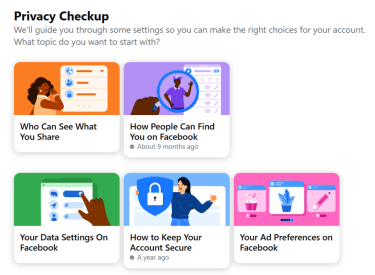
Now, work through these tasks methodically:
- Limit profile details like phone number, email address, and birthday to “Only me” or “Friends” if you don’t need them to be public.
- Review old posts and set the audience you actually want, then consider limiting the audience for past posts in bulk.
- Delete your Facebook search history to clear out stored metadata about your interests and habits.
- Check which search engines can link to your profile and restrict them if you feel exposed.
These changes won’t remove data already leaked in previous breaches, but they can help reduce the amount of visible information going forward and shrink what a new attacker could access.
Enable two-factor authentication
Two-factor authentication (2FA) adds an extra step when someone logs in with your password, such as a code from an authenticator app or a hardware key. That extra step can stop account hijacks.
After you turn on 2FA, it activates when someone tries to log in from a browser or device that Facebook doesn’t recognize. If the attempt doesn’t complete the second step (a code from your authenticator app or SMS, or a security key), Facebook will prompt you to review the login and can block access until you confirm it was you.
Here’s how to turn it on:
- Go to Settings & privacy > Settings.

- Go to Accounts Center.

- Click on Password and security > Two-factor authentication.

- Select your account and follow the on-screen instructions to choose your method (third-party authentication app, SMS or WhatsApp, or security key).
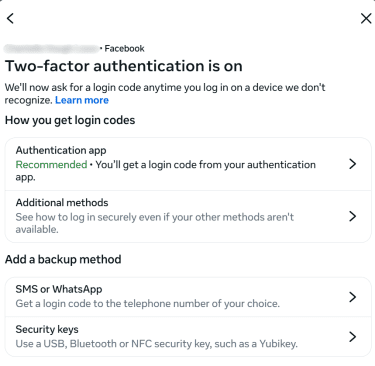
For stronger protection, use an authenticator app or security key instead of SMS. Attackers may be able to reroute text messages via SIM swap scams, but app codes and security keys aren’t vulnerable to this form of attack.
Where Facebook offers it, you can also add a passkey for your account so you can log in with device-based credentials that reduce the risk of phishing and credential stuffing.
Review login sessions and remove unknown devices
Regularly reviewing where your Facebook account is logged in is a crucial step in detecting potentially unauthorized access to your account. Facebook lists active sessions, including device type, app, and location.
To review active login sessions:
- Select Settings & Privacy > Activity log.

- Select Where you're logged in to see recent login information.
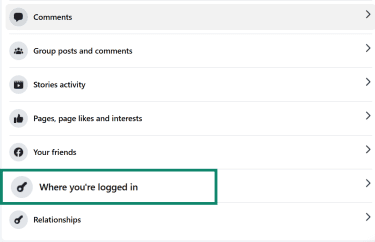
Now go through the list and:
- Log out of any device, browser, or location you don’t recognize.
- Log out of older sessions that you no longer use, such as a shared family tablet.
- Turn on login alerts to receive a notification when new devices sign in.
If you see logins from countries you’ve never visited or devices you’ve never owned, treat it as a clear sign of compromised Facebook accounts and move quickly to change your passwords and enable 2FA.
Review connected apps
After a data breach, it’s a good idea to review the apps and websites connected to your Facebook account. These connections may have access to your personal information and could provide an additional entry point for attackers if compromised.
- Go to Settings & Privacy > Settings.

- Go to Apps and websites in the left sidebar to open a list of all the apps and games you've connected.

- Tap on an individual app to view more information, manage permissions, renew, or remove the connection.
Scan devices for suspicious activity
An intruder who knows your password may have gained it from malware or a malicious browser extension. Simply reinstalling the Facebook app without addressing these underlying threats can result in repeated account compromises.
To rule out possible malware infections, take these steps on any device where you log into Facebook:
- Run a full scan with trusted antivirus software.
- Remove browser extensions you don’t recognize or no longer use.
- Update your operating system and apps to close vulnerabilities that attackers might exploit.
If scans keep finding threats, consider a deeper reset for that device, such as a full OS reinstall or factory reset after backing up data securely.
Report the incident to Facebook
If you believe your Facebook account has been hacked, or if you encounter fake profiles or impersonation attempts, it’s important to report these issues to Facebook promptly. These reports help Meta spot larger attack patterns and may help you recover access if the intruder changed your contact details.
You can use the following official channels to submit your reports:
Report a hacked account
Facebook provides a dedicated recovery path at facebook.com/hacked that walks you through changing your password, logging out suspicious sessions, and reviewing recent activity.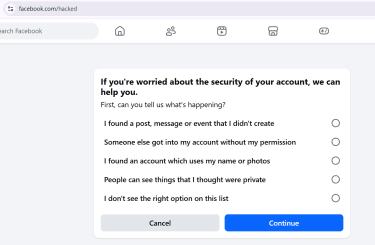
Report a profile directly
To report a profile for any other reason, go to the profile (or ask a friend to help if the profile blocked you).
- Click the three dots below the cover photo and select Report profile.

- Choose a reason for reporting and click Submit.

Visit the Facebook Help Center
Visit the Facebook Help Center to locate guidelines for any other issues, for example, fake Facebook Pages or trademark abuse.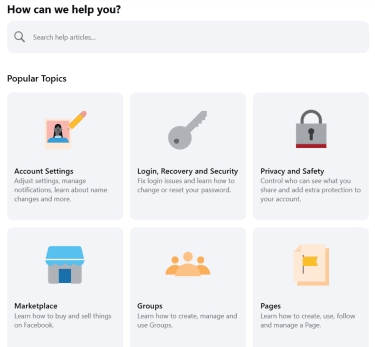
Potential legal steps if sensitive data was exposed
Important: This information is for general educational purposes and not legal advice.
Regulators treat large-scale data leaks seriously, especially where sensitive information or children’s data is involved. In Europe, for example, data protection authorities have fined Meta and other top social media platforms for misuse of user data.
If a breach leaks personal information that includes high-risk identifiers such as national ID numbers or financial data, you can also contact your local consumer protection body or privacy regulator about your rights. You might also consider speaking with a lawyer who focuses on privacy or consumer law if you face real financial harm.
Check if the breach affects linked apps or accounts
Many services and apps let you “log in with Facebook” or link your Facebook account for social features. In a breach or account hijack, those links become extra paths for damage.
Look at other services where you used Facebook as a login method and switch to email and passwords (or passkeys) with 2FA where possible. Then, audit any business tools, ad accounts, or Facebook Pages you manage, since attackers often exploit those to run scams.
This type of cleanup reduces the long-term impact of data theft on Facebook and lowers the chances that one breach cascades through the rest of your online life.
Can a VPN protect you from Facebook data breaches?
A virtual private network (VPN) is a powerful tool for network security and privacy, but it doesn’t address all Facebook security risks, particularly those related to data breaches. It helps to know what a VPN can and can’t do in the context of a social media data breach.
How a VPN secures your online identity
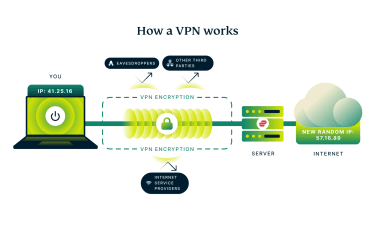 A VPN creates a secure connection between your device and a VPN server. It encrypts your internet traffic, preventing your internet service provider (ISP) and others sharing the same network (such as public Wi-Fi) from easily viewing your internet traffic. When you browse websites, they see the IP address of the VPN server rather than your device’s IP address, making it more difficult to associate your online activity directly with you.
For example, ExpressVPN handles Domain Name System (DNS) requests (the process that translates website names into numerical IP addresses) through its own secure servers. This limits your ISP from seeing these requests, adding an extra layer of privacy.
These features matter for Facebook safety in several ways:
- On public Wi-Fi, a VPN reduces the risk of attackers intercepting your Facebook activity or stealing session cookies that keep you logged in.
- By masking your real IP address, a VPN makes it harder for external trackers or advertisers outside of Facebook to link your browsing on other sites to your Facebook profile.
- Routing DNS requests through the VPN limits your ISP’s ability to log which websites you visit, reducing metadata exposure. Facebook’s own privacy tools like the Off-Facebook Activity tool can complement this by controlling how Facebook tracks you across the web.
Used consistently, a VPN shrinks the amount of metadata that various parties can collect about your use of Facebook, especially from coffee shop or hotel Wi-Fi networks that you don’t control. That’s an important layer of protection for your online identity.
Limitations of VPNs for social media privacy
A VPN protects the connection between your device and the VPN server, but it doesn’t change the data Facebook collects, stores, and shares once it reaches the platform. Here are the VPN limitations to keep in mind:
- It doesn’t prevent potential Facebook data leaks: A VPN can’t prevent breaches caused by bad actors directly targeting Facebook’s databases and systems.
- It doesn’t fix weak or stolen accounts: If someone gets your password or one-time code through phishing or malware, a VPN won’t block the login.
- It doesn’t hide your activity from Facebook itself: Facebook tracks your activity through your logged-in account and device signals regardless of the IP address shown.
- It doesn’t clean an infected device: If your device is infected with keyloggers or malicious browser extensions that record your keystrokes or screen activity, a VPN cannot prevent this data capture before encryption.
For these reasons, a VPN should be part of a broader security approach that includes strong, unique passwords, two-factor authentication (2FA), cautious privacy settings, and safe browsing habits, even if you use a VPN regularly.
FAQ: Common questions about Facebook data breaches
How do I stay updated on Facebook’s latest security issues?
You can follow Meta’s own security and integrity updates on the Meta Newsroom site, where the company posts quarterly security reports and major incident summaries. Combine that with coverage from reputable outlets that track recent Facebook security incidents and with announcements from your local data protection authority for enforcement news.
Can I get compensation for my leaked Facebook data?
In some regions, authorities have pursued regulatory processes after exposed user information led to harm. For example, EU regulators have imposed several fines on Meta for General Data Protection Regulation (GDPR) violations related to Facebook data handling. Check official regulator or settlement sites in your country for options, and speak with a lawyer for advice on your specific situation.
How do I find out whether I qualify for a Facebook data privacy settlement?
If a settlement exists in your region, it will usually have an official website with a clear case name, claims process, and deadlines. Regulators or courts sometimes link to these sites from their own pages. Avoid emails or ads that push you to share ID documents or pay fees to “unlock” compensation, since scammers often exploit leaked personal information from Facebook user data leak incidents in this way.
What are the signs my Facebook account has been hacked?
Look for password or email changes you didn’t make, new devices in your login history, messages sent without your knowledge, and login alerts from unfamiliar places. Meta’s help pages list these as classic signals of compromised Facebook accounts and advise you to use facebook.com/hacked straight away if you suspect a takeover.
How do I report a Facebook data breach?
You can’t usually report a large-scale breach yourself, since those events involve internal systems and forensic work. You can, however, report suspicious use of your own account and report fake profiles or Facebook Pages. If you believe a social media data breach has affected many people in your country, you can raise a concern with your national data protection authority or consumer regulator.
How can I check if my personal info (like SSN or phone number) was leaked?
Start with reputable breach-checking services such as Have I Been Pwned, which lets you search by email address and, for some incidents, by phone number. For high-risk identifiers like Social Security numbers (SSNs), combine breach checks with dark web monitoring, credit monitoring, fraud alerts, or freezes through your local credit bureaus. ExpressVPN’s Identity Defender suite offers these services to U.S. subscribers.
Take the first step to protect yourself online. Try ExpressVPN risk-free.
Get ExpressVPN