What is TCP/IP and how does it work


TCP/IP stands for Transmission Control Protocol (TCP) / Internet Protocol (IP), which is widely recognized as the core of digital communication. Every time you go online, stream a video, or download a file, your device uses the TCP/IP protocol suite to make it happen.
In this post, we discuss what you need to know about the TCP/IP protocol suite, including how it works and how to keep it secure in a networking setting.
How TCP/IP works
TCP/IP’s main job is to move data between devices over a network by defining how data is packaged, addressed, transmitted, routed, and received. To do that consistently, it needs to be accurate and reliable. TCP manages the accuracy and timing of data delivery, and IP determines where those packets need to go.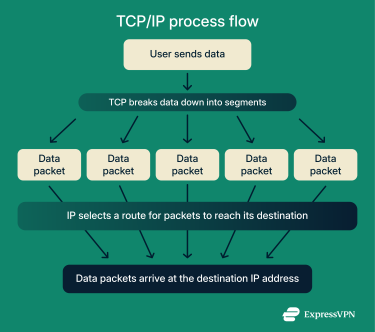
Information is sent in smaller units so it can travel efficiently. TCP breaks information into segments, and IP encapsulates those segments into packets before sending them across a network.
Routers make independent forwarding decisions, so packets from the same message can follow different routes. Packetizing data helps reduce the impact of errors. If one packet becomes corrupted, only that packet needs to be sent again. This saves time and reduces unnecessary bandwidth use.
As packets travel, IP uses the destination address to guide routers along the best available path. When the packets reach the correct device, TCP checks them for errors and requests retransmission if an error is detected.
Here’s a side-by-side comparison of TCP and IP:
| TCP | IP | |
| Main role | Controls how data is sent and ensures accurate delivery | Handles addressing and routing to the correct destination |
| Type of protocol | Connection-oriented transport protocol | Connectionless network protocol |
| Reliability | Provides sequencing, error checks, and retransmission | Best-effort delivery, no guarantees without TCP |
| Data handling | Splits data into segments and reassembles them | Packages TCP segments into packets with source and destination IP addresses |
| Routing | Doesn’t choose packet paths | Selects next hops and forwards packets across networks |
The four layers of TCP/IP
TCP/IP has four layers. Each layer consists of one or more protocols that perform a specific function. Below is a look at what each layer does and which protocols it uses.
1. Application layer
The application layer is the top layer of the TCP/IP suite. You interact with it whenever you use applications, web browsers, email, or cloud storage. This layer provides the interface between your software and the lower levels of TCP/IP.
Here are some of the main protocols it uses and what they do:
- HTTP: Supports communication between web browsers and servers. It handles how web content is requested and delivered over a network.
- File Transfer Protocol (FTP): Transfers files between a client and a server. It lets users upload, download, and manage files over a network connection.
- Simple Mail Transfer Protocol (SMTP): Sends email from a client to an email server or between email servers. It handles the transmission and routing of outgoing email.
- Domain Name System (DNS): Maps human-readable domain names (like example.com) into IP addresses, which computers use to route traffic.
2. Transport layer
This layer prepares your data for transmission. It uses two core protocols to make that happen: TCP and User Datagram Protocol (UDP). TCP creates the connection and checks the packets after arrival, while UDP sends the data.
Together, TCP and UDP give the transport layer the flexibility to support both reliable communication and faster, lightweight data transfers.
3. Internet layer
The internet layer uses the following protocols to make sure data reaches the correct addresses:
- IP: Decides the next hop for each packet so it can move toward its final destination.
- Internet Control Message Protocol (ICMP): This protocol reports delivery issues such as timeouts or unreachable hosts and helps diagnose network problems.
- Address Resolution Protocol (ARP): ARP maps IP addresses to physical Media Access Control (MAC) addresses. It lets devices on the same local network find each other, so packets reach the correct hardware address.
This layer handles how data packets move across networks. As part of this process, IP uses subnet masks to determine which portion of an IP address identifies the local network and which portion identifies the individual device.
Learn more: What are IP address classes?
4. Network access layer
The network access layer is the lowest layer of the TCP/IP model. It handles everything needed to physically send and receive data over cables, Wi-Fi, or fiber.
- Data link level: This part of the TCP/IP suite handles tasks like MAC addressing, frame creation, and media access control so devices on the same local network can communicate.
- Physical level: Deals with the actual hardware and signaling methods used to send data over cables, fiber optics, or wireless radio signals.
Ethernet and Wi-Fi operate in this layer. They convert packets from the higher layers into frames and send them over the network so they can reach the next device in the path.
Practical applications of TCP/IP
Use in web browsing and email
When you send or receive emails, TCP/IP carries traffic for protocols such as SMTP, Post Office Protocol 3 (POP3), and Internet Message Access Protocol (IMAP). SMTP handles sending messages to mail servers, while POP3 and IMAP let you download or synchronize those messages on your devices.
Role in the Internet of Things (IoT) and smart devices
Smart devices like sensors, home appliances, wearables, and industrial systems use lightweight TCP/IP-based protocols to send information to cloud platforms or local hubs. These protocols enable devices to report status updates, trigger alerts, and coordinate tasks in real time, even when they have limited power or bandwidth.
Enterprise networking
In business networks, TCP/IP facilitates communication across everything from office Wi-Fi to large data centers. It enables essential services such as file sharing, internal applications, directory services, and virtual private network (VPN) connections. The flexibility of TCP/IP allows organizations to expand to new sites, support more devices, and maintain consistent connectivity across the entire network.
TCP/IP vs. Open Systems Interconnection (OSI) model
Both TCP/IP and OSI define how data moves across a network, but each serves a different purpose. OSI is a conceptual model for teaching networking concepts, and TCP/IP reflects how modern networks actually operate.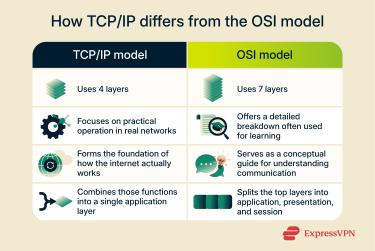
OSI layer comparison
OSI splits networking into seven distinct layers to make it easier to explain to learners. TCP/IP, which is what’s used in real life, can group more tasks into a single layer. Here’s a breakdown of each OSI layer.
- Application layer: Supports software-level services such as browsing and email.
- Presentation layer: Formats, translates, and encrypts data so systems can interpret it.
- Session layer: Creates and maintains communication sessions between applications (TCP/IP folds these tasks into the application layer).
- Transport layer: Manages end-to-end delivery and flow control, matching TCP/IP’s transport layer.
- Network layer: Routes packets between networks using logical addressing.
- Data link layer: Handles framing, MAC addressing, and local delivery.
- Physical layer: Moves raw data across cables, fibre, or wireless signals.
Why TCP/IP is preferred
Real networks use TCP/IP over the OSI model because, once implemented, it proved to work at scale on the early internet. Its four-layer structure keeps it simple, while the OSI model’s seven-layer structure works better for learning than implementation.
TCP/IP is built around practical, widely used protocols. Each layer reflects the technologies that real networks rely on, making the model well-suited for modern infrastructure. It supports essential functions such as routing, error handling, and congestion control without adding unnecessary complexity.
The model’s open-standard status helped it achieve universal adoption. Since vendors and developers can use it without restrictions, it’s the default choice for the internet and most private networks. That said, while TCP/IP is the model that real systems follow, OSI is still useful for explaining networking concepts.
Is TCP/IP secure? Common vulnerabilities and best practices
TCP/IP itself isn’t designed with strong security features. It focuses on moving data between devices, so most protections rely on additional tools like encryption, firewalls, and authentication systems. As a result, several weaknesses can affect networks that rely on TCP/IP.
That said, modern networks add security through encryption layers such as Transport Layer Security (TLS), which protects data as it travels between applications. TLS is the modern encryption protocol that protects data as it travels between applications. It replaces the older Secure Sockets Layer (SSL) protocol, which is now deprecated and considered unsafe.
Common attacks that target TCP/IP networks
- Distributed denial-of-service (DDoS) attacks: Overwhelm a server with massive amounts of traffic, causing it to exhaust its resources and fail to respond correctly.
- Sequence number attacks: Tries to guess the numbers TCP uses to keep track of data packets, which can let an attacker slip into a connection or disrupt it.
- TCP session hijacking: Takes over an active connection by inserting forged packets, letting the attacker impersonate a trusted device during the session.
- TCP Reset (RST) and Finish (FIN) attacks: Send fake reset or finish commands to force a session to close, disrupting communication between two legitimate devices.
- IP spoofing: Fakes the source IP address on packets to look like a trusted device. This makes it easier to bypass access controls or gain network access.
- Ping O Death: Sends oversized or malformed ping messages that older or unpatched systems can't handle, sometimes causing them to freeze or crash.
How VPNs protect TCP/IP traffic
A VPN enhances the security of TCP/IP data transmission by encrypting and tunneling it through a private server. When your VPN is active, your device places your regular TCP/IP packets inside an encrypted VPN packet before sending them across the network. This prevents outsiders, such as piggybackers and Wi-Fi eavesdroppers, on the local network from viewing or intercepting your data.
Using a VPN also masks your IP address, making it more challenging to track you online. Hiding your IP address also helps to keep your approximate location private from anyone who can see your network traffic.
How to secure your TCP/IP network
A secure TCP/IP environment relies on strong controls that limit how attackers move across a network. Clear policies, careful configuration, and continuous monitoring help protect devices from protocol-level threats targeting everyday traffic.
- Inspect packet activity: Intrusion detection and prevention systems (IDPS) examine network traffic in real time and flag unusual behavior. These tools help identify attempts to exploit TCP or IP weaknesses before they spread.
- Filter traffic with firewalls: Firewalls use defined rules to control which packets can enter or leave a network. Restricting traffic from unknown or suspicious sources helps limit exposure to common TCP/IP-based attacks.
- Limit unused services: Older or unnecessary network services create openings that attackers can exploit. Disable services you don’t need and restrict access to those you keep.
- Monitor traffic and logs: Regular traffic analysis helps reveal patterns that may signal an attack. Tracking unusual spikes or unexpected routes gives you early warning of potential compromise. Most network monitoring tools, firewalls, and security information and event management (SIEM) platforms can track traffic patterns and record connection activity.
- Keep devices and firmware up to date: Routers, switches, firewalls, and operating systems often have TCP/IP stack vulnerabilities. Apply security patches promptly to close known exploits.
Pros and cons of the TCP/IP model
Advantages of TCP/IP
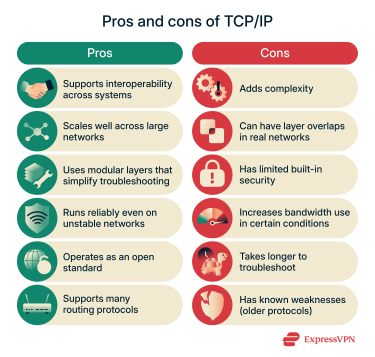
- Supports interoperability across systems: TCP/IP works smoothly across many types of hardware and operating systems. This makes it easier for networks to connect devices from different vendors without worrying about compatibility.
- Scales well across large networks: It supports simple home setups as easily as large enterprise networks or the global internet, handling more traffic and complexity over time.
- Uses modular layers that simplify troubleshooting: Because each layer handles a specific function, engineers can isolate issues more easily and test one part of the stack at a time.
- Operates as an open standard: No single vendor controls it, which encourages development and makes it easier for different technologies to work together.
- Supports many routing protocols: The model supports several routing protocols, giving networks flexibility to manage traffic as conditions change.
Disadvantages of TCP/IP
- Adds complexity: Network routing, IP addressing, and transport settings demand careful management. Without the right experience, these tasks can become difficult for smaller teams or simpler setups.
- Can have layer overlaps in real networks: Some functions don’t stay neatly within one layer. Tasks that appear to belong to a single layer in the model may behave differently in practice, leading to confusion.
- Has limited built-in security: TCP/IP doesn’t include strong native protection. To secure traffic, networks need extra tools such as TLS, Internet Key Exchange version 2 (IKEv2), WireGuard, or Internet Protocol Security (IPsec)-based tunneling.
- Increases bandwidth use under certain conditions: Extra packet overhead and retransmissions can increase bandwidth use. Networks with high latency or frequent errors may see slower performance as a result.
- It can be time-consuming to troubleshoot across layers: Even though each layer is separated, a single issue might involve several layers working together. This can take longer to trace when the root cause isn’t obvious
- Has known weaknesses (older protocols): Some older protocols have documented vulnerabilities, but are still in use. Keeping them secure often requires regular patching or full replacement.
FAQ: Common questions about TCP/IP
What’s the difference between TCP/IP and HTTP?
Transmission Control Protocol (TCP) / Internet Protocol (IP) is the set of protocols that underlie how data moves across a network. HTTP is the application-level protocol that tells your browser and a website how to share information. TCP/IP is used by any device that sends data across a network, whereas HTTP is used by web browsers and web servers when loading or exchanging web content.
Can TCP/IP function without the Open Systems Interconnection (OSI) model?
Transmission Control Protocol (TCP) / Internet Protocol (IP) doesn’t depend on the OSI model to operate. OSI is a teaching framework, while TCP/IP describes the protocols that real networks use. The two models can be compared, but only TCP/IP defines the actual technologies used on the internet. Learn more about the difference between TCP/IP and OSI.
Why is Transmission Control Protocol (TCP) / Internet Protocol (IP) so important in networking?
TCP/IP matters because it enables modern connectivity. It lets devices communicate with each other, even when they run different hardware or operating systems. It has many advantages for managing data flow across networks of any size. Since it is an open standard, developers and vendors can use it freely, which is a big reason it has become the foundation for almost every network today.
What are the versions of TCP/IP?
During development, early IP implementations were labeled with version numbers such as IPv1–IPv3. IPv4 became the dominant version and still underlies much of today’s internet, while IPv6 is the newer upgrade designed to replace it. In the Transmission Control Protocol (TCP) / Internet Protocol (IP) model, there are no formal version numbers; versioning applies to the IP protocol itself.
Take the first step to protect yourself online. Try ExpressVPN risk-free.
Get ExpressVPN